Module 15- Class Reflection

When I think back over my last year and a half as a SLIS students, I have learned so much and been shown so many important tools and skills.  Each class had its own benefits and I can say I am now way more now than when I started, but I must say 761 has by far been my favorite course.  There were many times when reading through course material or assignments and I though there is no way I can do that.  There is no way I can create a digital curation… that sounds too hard.  There is absolutely no way I can create a website from scratch… I have no training in that.  Well, I did it and loved every minute!

What idea, tip, recommendation, resource, or technology will you take with you from this module and from this course into the field of librarianship?  What will be useful in your profession?

My favorite resource from this class was Pearltrees, the digital curation tool.  I used it for my digital curation and immediately began sharing it with my teachers at school.  I, like many other teachers, always had a million bookmarks at the top of my internet browser or would save a list of websites on a word document.  I no longer have to do this.  Pearltrees was easy to use, easy to share with others, and even had a cool side bar that led you to other digital curations similar to yours.  It was by far my favorite tool to use this semester.  It saves so much time and is very user-friendly.

How will you use practices and tools such as digital curation, blogshares, social media, practitioner publications, and special reports to identify the trends on the horizon of school librarianship?

In the beginning of this course I was unsure about the blog page.  I felt like it would be the same as using a discussion board and didn’t really see the value of doing it.  However, after a few weeks I began to see the benefit.  It was very personalized.  People can subscribe to it, comment back, or privately message you.  It allowed for more than just a post, anything could be added.  This will be a great tool for sharing new technology with my students and teachers.   I also thought this might be a great tool to share with our yearbook/journalism class.  They could use a blog to get out information they need to students.  This would also allow them to highlight features of the yearbook and possibly sell more copies.

Overall this class has been wonderful and has opened my eyes to many new technology tools, some of which we are now using within the school where I work.  This has been a wonderful experience!
Module 13- VR/AR tools

Virtual and augmented realities have been all the rage the last few years.  VR and AR tools are used within the workforce, classrooms, and personally.  For instance, Pokémon Go was a very popular virtual reality game that everyone was downloading around 2016.  The app stated “you will need to explore your real-world surroundings (RayL, 2016).”  This app was downloaded by thousands and got people up and out of their houses to explore.  Although I think these kinds of apps are fascinating, I believe its academic benefits are slim.  I also feel that apps like these can be dangerous for users young and old.  For this reason, I chose to focus on a more academic VR/AR tool, the Ricoh Theta-S 360 camera.

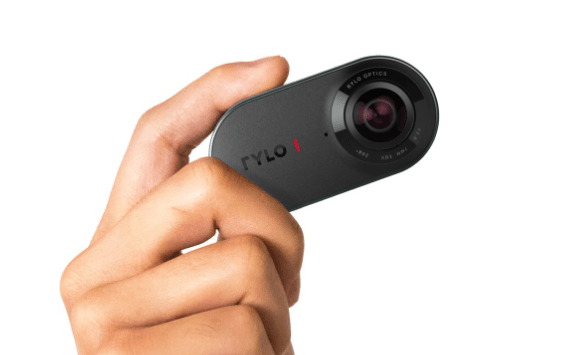
The Ricoh Theta-S 360 camera offers a 360 degree view of its surroundings.  In the article Virtually There: Kids are using VR to explore worlds and create new ones, the author explains how different schools around the United States use technology within their school.  Parkville High School created a project to help other students learn about social anxiety.  They used the Ricoh Theta-S 360 camera to create a video titled “Breaking Barriers.”  In the video, students see from a student point of view how it feels to have social anxiety.  The project was completely student driven and created.

The camera is not very costly, only about $499.  This is less than buying a Canon Rebel, which are used by many schools for publications.  The camera can be used for various projects within the school setting.  It is small, light and easy to use.  The purchasing website explains how it is easy to edit video and that users shouldn’t be worried about having unsteady hands when videoing, because editing will assist in fixing this. The company also offers a 30-day risk free return.  This means you can try the product with your students and if it doesn’t work well, you can send it back.

rylo.PNG

Rylo camera purchase includes:

  • 360 Camera

  • Rylo Everyday Case

  • 16GB microSD card

  • Battery

  • Charging cable

  • Lightning (iOS), micro-USB, and USC-C sync cables

  • Protective Pouch

In the school where I currently work, students and teachers have started to create videos which are being used during our advisement period each week.  The videos are created to inform students about courses we offer or about a strategy that will help them when they leave high school.  One of the biggest issues we have is camera quality and making the videos meaningful for students.  If we could use a Ricoh Theta-S 360 camera offered through Rylo, students could come in the library and watch the 360 videos on a VR screen.  They could also watch it using the app provided by Rylo.  This would make the video more interactive and hopefully more meaningful.

Meyers, L. (2017). Virtually There: Kids are using VR to explore worlds and create new ones.  Retrieved from https://www.slj.com/?detailStory=virtually-kids-using-vr-explore-worlds-create-new-ones.

RayL.  (2016).  Pokemon Go at Trinton Public Library.  Retrieved from https://torontopubliclibrary.typepad.com/kids-books/2016/07/pok%C3%A9mon-go-at-toronto-public-library.html.

Rylo. (2019). Retrieved from https://shop.rylo.com/.

Module 11- Makerspace Blogshare

makercare

                When I started graduate school over a year ago, one of the new concepts I learned about was makerspaces.  From my understanding these were cool ways for students be creative while in the library.  When I worked in an elementary school, our library had a Lego station and coloring station. The kids loved these, but I wondered how high school students would respond to these stations.  When I started in the high school library I work in now there was only one big room with books and many, many tables.  I began by cleaning out the storage room (aka junk room) in the back of the library.  This is now the College and Career Readiness Room.  The room contains college brochures, scholarship information, and a work station, complete with scissors, glue, markers, and other craft materials.  Before beginning this week I did not think of this as a makerspace, but after reflecting I believe it is.  The room also contains comfy couches and beautiful chairs.  It has become the room to discuss future plans in.  On a daily bases I now have students working on projects and making life changing decisions about their future based on what they learn in that room.

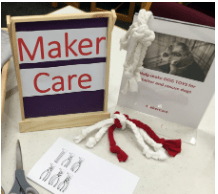
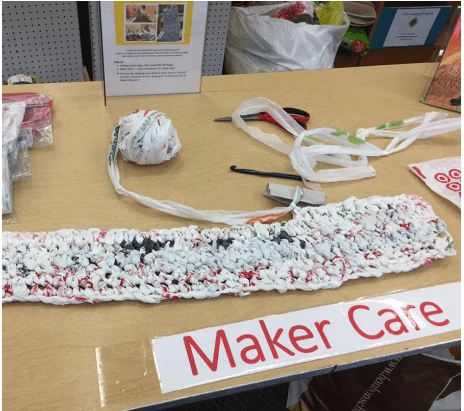
I have also tried a few other makerspaces in the library, like blackout poetry and a coloring station.  These were an epic fail!  Students were not interested and saw it as meaningless.  However, this week as I was researching makerspace blogs, I came across the blog “How to Inspire Students to Be Compassionate Makers (https://ideas.demco.com/blog/inspire-students-compassionate-makers/).”  It describes the makerspace as a MakerCare Program, where students create things to improve the community or out of compassion for others.  This blog caught my attention due to the fact that most of the creations are geared more towards high school students.  At the very top of the blog the quote from Martin Luther King, Jr “Life’s most persistent and urgent question is, what are you doing for other?”  At the school I work at currently we have been focusing on a sense of community and how community involvement makes the school and world a better place.  The blog explains that stations should be focused on making a difference in the school, local, and even national community.  Canino-Fluit states in the article School Library Makerspaces, that “Making at the library should be about helping your students identify the problems they want to solve and the things they want to create and teaching them to use the tools they need in order to do it.”  This could easily be done in a MakerCare Program.  Some of the suggestions were making dog chew toys for the local animal shelter, photo buttons for athletes and their families, and mats for the homeless made from crocheted paper bags.  These projects are meaningful and would make students feel like their creation is more than just some picture that would eventually be thrown away.  The projects created within this MakerCare Program would have made a difference in the world.   They would be an asset to any school, no matter the age.  Students should learn to have compassion at any age and a makerspace would be a great way to foster that.

makercare2

Canino-Fluit, A. (2014).  School library makerspaces.  Teacher Librarian41(5), pp21-27.

Seymour, G. (2017). How to inspire students to be compassionate makers.  Retrieved from https://ideas.demco.com/blog/inspire-students-compassionate-makers/ .


Module 9- Cyberbullying

Cyberbullying is a real problem in school and society.  I work in a high school and I cannot tell you how many times I have heard adults in our school and around our community say they were so glad they grew up in a time (meaning high school years)  without Facebook.  It is all to easy for students to share their photos, articles, and their opinions without ever having to look someone in the face.  To combat cyberbullying we must teach students about “cyberbullying awareness and prevention as well as strategies to protect themselves if they are victimized (Orech, 2012).”

To address digital citizenship and cyberbulying, the district I work in has been discussing how we can help our students and staff be aware of what is and is not appropriate when online.  One tool we have found is https://www.learning.com/.  This website offers interactive videos for students to learn about cyberbullying and other digital citizenship tools.  The website has videos for all grade levels, K-12.  They take anywhere from 10-15 minutes for students to complete and the students must answer questions to move on.  All data is reported back to the teacher.

This week I found Richard Byme’s Seven Deadly Sins (Bymes, 2014) interesting.   The video about pride was intreging and it made me think of my high school students.  They are always on Facebook, Twitter, Snapchat, and whatever else they post on.  I had one student tell me this week that she was not going to the afterschool detention she was assigned for tardies, that only lasts for an hour, because she wouldn’t be able to have her phone for that hour.  She chose instead to take a day of OSS.  The student told me she just didn’t feel like she could be away from her phone for that long.  This blew my mind!  When I was in school, so I find it hard to relate to.

Last year, I had an incident where a student was written up for cyberbullying on our campus.  A girl sent him a Snapchat and he messaged her back explaining how ugly she was, along with a few other lued comments.  His punishment was that he was not allowed to have any device at school for one month.  Although, he thought he was going to go crazy, he told me later that he learned a lot and didn’t realized how attached he was to his phone.  The boy also said he apologized to the girl and that he would have never said those terrible things to her face.  Technology gave him a shield that felt comfortable behind, until it was there no more.

Cyberbullying is a huge issue, but hopefully with the right curriculum and dedication from teachers and administration students will understand it’s impact on others.  Hopefully we can teach them to be respectful digital citizens.

Bymes, R. (2014).  Free technology for teachers.  Retrieved from https://www.freetech4teachers.com/2014/08/seven-digital-deadly-sins-good-material.html#.WjMOYFQ-fBI.

Orech, J. (2012).  How it’s done: Incorporting digital citizenship into your everyday curriculum.  Tech & Learning, 33(1), pp16-18.

https://www.learning.com/

Module 8- Web 2.0 tools

padlet

This week I found Heather Moorefield-Lang’s article “An Exploration and Explanation of Device Agnostic Tools” very interesting.  She offers information about teaching tools that will “work across the board,” which means they can be used with several different devices.  Some of the tools she offers are Kahoot, Socrative, ClassDojo, and a few more.  All of these are excellent tools for teachers to use within their classroom.

The tool I would like to focus on is Padlet.  This is a tool for student to use like “pinning notes on a bulletin board (Moorefield-Lang, 2014).”  Students and businesses are able to add documents, pictures, and text to their board and share with others.  The slogan for Padlet is “Collaborate better.  Be more productive (https://padlet.com, 2019).”  The idea behind Padlet is for users to be more productive by utilizing this easy-to-navigate resources.   This tool can be used on a computer, tablet, or phone device.  Information can be added using all these devices.  The end result ends up looking like a blog site where information is shared and organized easily.

Padlet is available as a free trial for thirty days.  After that the cost is $12 a month for teachers or $99 a year.  The tool can also be purchased by a school for $1499 a year.  The school account includes teacher and student accounts.  This may seem like a lot of money, but would saves schools a lot of money in paper each year.  Teachers and students would be able to collaborate on many projects and organize the material in a logical way.  The material would also be easily assessable by students from home.  There are also safety and privacy features.  The information shared on your Padlet will only be able to be seen by your school.  The site can also be personalized with your school’s name and logos.  The tool also has features to restrict “bad words” and collect data for teachers to use.

This would be a valuable tool for any teacher or student who has technology readily available to them.  This will make collaboration and organized information more easily available to students.  The site will also allow teacher to monitor student collaboration easily.  Overall this is a very useful web 2.0 tool for teachers.


Useful Resources:

Palet – https://padlet.com/

Padlet Tutorial for Teachers- https://www.youtube.com/watch?v=f51WeQVLeVU

Padlet Tutorial for Students- https://www.youtube.com/watch?v=YsV4ShNddYY


References:

Padlet.  (2019).  Retrieved from https://padlet.com.

Moorefield-Lang, H. (2014). An exploration and explanation of device agnostic tools.  Library Media Connection, 33(1), pp8-9.  Retrieved from https://login.pallas2.tcl.sc.edu/login?url=http://search.ebscohost.com/login.aspx?direct=true&db=lfh&AN=98009373&site=ehost-live.

Module 7- Assistive Tools

The tool I would like to share this week is Ginger software.  This is a proofreading tool used for students with dyslexia and other reading difficulties.  Ginger is a free software that can be downloaded on any computer for free.  The software checks for simple grammar errors, like the misuse of there, their, and they’re.  It also contains word phrasing and prediction tools to help students construct proper sentences.  The software also contains text-to-talk services so that students can hear how their writing sounds.  One additional feature of the software is built in practice session based on the mistakes the user makes.  This provides personalized learning for each user.  The Ginger software can easily be accessed at https://www.gingersoftware.com/.  There is a premium plan that can be purchased, but the basic plan comes with grammar checker, sentence rephrase, translation, dictionary, text reader, and the personal trainer.

These tools would be beneficial to self-contained, resource, and inclusion students.  This would give students the confidence to write well, without the facing many frustrations normally caused by writing.  This tool could also be beneficial to students who are less confident writers.   When thinking about inclusion and how it should work seamlessly within a classroom, I believe Ginger software would allow for an easier transition.  Before I was a librarian, I was a classroom teacher.  Many of my students with IEPs and 504s were able to verbally communicate with me, but struggled to share their ideas through writing.  This tool would have allowed them the opportunity to be successful not only orally, but also in written form.

When thinking about inclusion tools like Ginger software, close captioning on videos, Google tools, and other electronic features will be what makes the difference in them being successful or not.  We need to set students up for success and using these tools will help in achieving that goal.

Module 5&6- Integrating Technology

Interactive whiteboards are used in classrooms all over the United States.  These whiteboards are used in many ways to enhance learning.  The whiteboards help save districts money due to the fact that they do not have to print as many worksheets.  Teachers are also about to use active software to save copies of their lessons for students that may have missed the lesson.  The interactive whiteboards also allow for lesson that enhance classroom experiences.  For instance, the whiteboards can be used to virtually travel to other countries and can be used to communicate with other across the globe.

The R.A.T. model is a model used within education to explain how technology is being used in a classroom.  The model explains how teachers are using technology within the classroom.  Technology is used to replace, amplify, or transform learning.  The R.A.T. model can easily explain how interactive whiteboards are used within the classroom setting.

R: Replacement

The ‘R’ stands for replacement.  This is when educators use technology to replace instruction.  For instance, if a mathematics teacher uses the promethean board or interactive whiteboard to display a problem.  They have simply used the board as a replacement for a worksheet or a replacement for writing on the white board.  The technology really does not enhance the lesson, but rather works as a replacement for something else.  It does not enhance the learning in any way.  This is not necessarily a bad thing.  Using technology instead of paper can be beneficial and save a vast amount of money.  It also gives the teacher the opportunity to print class notes for those who may be absent or for students whose IEPs require guided notes.  The technology simply replaces paper-based instruction.

A: Amplification

The ‘A’ stands for amplification.  When amplification occurs the educator is using technology to enhance and amplify the lesson.  If the mathematics teacher uses the promethean board to solve a problem using digital base ten blocks that break apart.  This would enhance the lesson.  Students would now be able to work out the problem and see how that converts into concrete objects.  The task stays “the same while the technology extends our capabilities in effectiveness (Hughes, 2018).”  The interactive whiteboard or promethean board is used to extend learning to help students enhance understanding.

T: Transformation

The ‘T’ stands for transformation.  Transformation is when technology enhances learning and “reinvents aspects of instruction, learning, or curriculum in new and original ways (Hughes, 2018).”  The technology is used to have students think critically and problem-solve.  The interactive whiteboard can be used here for groups to come together to solve a problem.  They may have many different digital tools to use to come to find their answer.  Teachers can also use digital apps to enhance technology to move them to the transformational stage.  It does not have to be a simple problem on the board.

Technology Tips for Interactive Whiteboards

When using an interactive whiteboard there are numerous sites teachers can use.  Almost any technology, software, or website can be used along with the interactive whiteboard depending on the subject area being taught.  Below is a list of suggestions and the curriculum the would enhance.

Curriculum/Content Website suggestions
English http://www.eslgamesworld.com/- This website was created for English Language Learners.  However, it is a wonderful tool for students to practice grammar skills.  There are many games on irregular and regular verbs, tense, and vocabulary.
Math https://www.mathplayground.com/ – This website contains many interactive math games that can be used on the interactive whiteboard for guided learning.  Students could also use these within the computer lab for independent learning and lesson enhancement.


https://www.khanacademy.org/ – Khan Academy is a wonderful tool to enhance lessons.  It offers virtual lessons, practice problems, and interactive learning.

Geography https://www.google.com/earth/ – Using this website and interactive GPS tool, students can travel to any place in the world.  This will allow them to experience different cultures and see different landscapes without leaving the classroom.


https://geoguessr.com/- This is a fun interactive GPS learning tool.  The game shows students somewhere in the world/US or a particular region and students must guess where it is based on the clues given within the landscape.  It helps students learn about physical features around the world.


Hughes, J. (2018).  R.A.T. Model. Retrieved from http://techedges.org/r-a-t-model/.


Module 4- Technology Plans & Blogs

When looking through blogs this week I found many that were interesting.  I found blogs on how to make posters print on 8×11 paper, how to determine if an app was using augmented reality or virtual reality, and so much more.  The Doucette Library of Teaching Resources has a blog with many useful entries.  One that caught my eye was entitled “Coding for Middle Grades-Some Advice.”  The blog explains several coding tools appropriate for the middle grade levels and even suggests software to use.  It was also suggested that even though this is a digital tool, that all coding instructions should be printed for students.  I have been to multiple classes for coding and have written code in some classes at USC.  It is certainly takes some patience and typing skills.  It was even helpful for me to have the coding instructions in front of me while trying to complete my task.  The blog states, “Typing skills are not at the place in the early years that make typing code a possibility.”  So for a coding initiative to work within a school there must be a plan. However, I do not believe this is a plan that should be implemented in younger grade levels.  In the middle grades it needs to be taught as a way to think critically and problem-solve.

This week’s readings were all about having a technology plan.  This is a very critical part of any library.  There must be a plan to keep up with the ever changing amount of technology being created.  Although the technology plans and the detail put in to them was very interesting, the article entitled “A Technology Plan: Administrators should keep five lessons in mind as they implement new technology initiatives” stuck out to me the most.  This article listed five lessons administrators (and districts) need to think about when implementing a technology plan.  When implementing a plan like coding within a middle school, it will be crucial for the administrator to be on board.

The lessons within the article began with the focus that new technology is not just about technology, but about helping students within a classroom become more successful.  If coding is what the technology team chooses to focus on their must be a reason.  Students must benefit from the problem-solving and critical thinking skills learned when coding.  The second lesson focuses around letting the technology plan fit the school.  Administration should not be buying and trying to implement technology that will not be useful.  The third lesson, which I believe is one of the most important and often the most overlooked, is planning professional development to assist teachers in using the technology purchased.  The issue that arises is “a district outlays funds for equipment long before anyone realizes that professional development will be a necessary expenditure if the equipment is going to see any action (Overbay, 2011).”  This is very true!  Most teachers have never using coding at any point in their lives and will need training on this.  It is the job of the technology team and librarian to lead professional development to assist them.  Without this assistance the technology purchased will most likely not be used.  The fourth lesson is to collaborate about the technology.  Teachers and librarians should be collaborating to determine best practices when using the technology within their classrooms.  Librarians should be taking the leadership role and leading model lessons to ensure teachers are comfortable using the technology. “Teacher librarians should act as leaders within their school community to ensure that learners are equipped with the skills and knowledge they need to succeed in the technological society of the 21st century (Johnson, 2012).”  The last lesson is for administration to make sure the technology initiative is continuous from year to year.  Rome wasn’t built in a day and neither are technology skills!

Douchette Library of Teaching Resources.  (2018). Coding for middle grades-some advice. Retrieved from https://doucetteedtech.wordpress.com/2018/11/01/coding-for-middle-grades-some-advice/.

Johnston, M. (2012). Connecting teacher librarians for technology integration leadership.  School Libraries Worldwide, 18(1), pp 18-33.

Overbay, A., Mollete, M., & Vasu, E. (2011). A technology plan: Administrators should keep five lessons in mind as they implement new technology initiatives.  Educational Leadership.

Module 3- The Information Diet

The topics of information literacy, technology, and digital/media are always popular among library/media specialist discussion.  Information literacy is being about to find and understand information, no matter what that information may be or how you find it.  Technology is used more abundantly now within libraries than ever before.  Material can be found digitally and through other media forms.  However, for a student to be information literate they must be able to use technology and multiple forms of media to retrieve the information they need.

When looking through the P21 framework and definitions, I was able to see that this framework is designed to develop a productive member of society.  The framework reminded me of the Profile of a South Carolina Graduate.  All of these documents were created to remind educators that we are helping create the next generation to lead our country.  They need a content rich environment, but also the soft skills to be able to function in everyday life.  At the high school where I work, these are buzz words.  Quite often we here that students are intelligent and can pass any test put before them, but often do not have the soft skills and endurance to perform on a job.  These are the skills the P21 framework is focusing on, along with academics.

As far as an information diet goes, I had never really thought about my diet.  Clay Johnson states, “You have to be a conscious consumer of information.”  I am very guilty of spending way too much time browsing Facebook, looking at information that I know has no real merit.  However, I continue to browse.  Johnson continues by telling up to “turn on your mindful brain.”  This is great advice, not only for our information diet, but for our everyday lives.  If we can teach students to turn on their mindful brains and make logical decisions, then they will have no problem with the 21st century skills in the P21 framework and the Profile of a South Carolina Graduate.  The real question is now does this become a normal everyday practice for students (or adults)?  I think we can begin by introducing students to some of those big questions discussed during the Fake News and Media Literacy podcast.

  • Where was this published?
  • Do they accept letters to the editor?
  • Who owns this company?
  • When was this published?
  • Do they cite specific sources?
  • Is the article well-written?
  • Does anything in the piece make me angry or afraid?
  • Is the article one sided?


Framework for 21st century learning.  Retrieved from https://blackboard.sc.edu/webapps/blackboard/execute/content/file?cmd=view&content_id=_12634683_1&course_id=_1046806_1.

Gunger, M. (2017) Fake news & media literacy. The Liturgists. [podcast]  Retrieved from http://www.theliturgists.com/podcast/2017/3/7/fake-news-media-literacy.

P21 framework definitions.  Retrieved from https://blackboard.sc.edu/webapps/blackboard/execute/content/file?cmd=view&content_id=_12634684_1&course_id=_1046806_1.

Module 2- Compare/Contrast AASL and ISTE standards

Standards are a major part of education within the U.S.  No matter what subject you teach or even if you are a paraprofessional within the building, you have been exposed to standards and understand their importance within the classroom.  The AASL and ISTE standards are no different.  The AASL standards focus on students and the information literacy they will need within their daily lives.  These standards are designed for the librarian to facilitate learning and help students to inquire, research, and grow collaboratively.  The AASL standards help to “prepare graduates” for life after high school (Dotson, 2015).

The ISTE standards are a little different.  There are standards written for students, coaches, administrators, and more.  These standards focus on problem-solving skills and computational thinking.  The articles for this week mostly focus on the coach’s role.  The ISTE “evaluate the skills and knowledge that education coaches need” to be effective within a school (Dotson, 2015).   The standards are geared towards strengthening coaches, who will in turn strengthen education within a school setting.

The goal of the AASL and ISTE standards is to improve learning within schools.  They are both designed to help educators and students continue to grow as learners. In the article “Factors of Engagement: Professional Standards and the Library Science Internship” there were several key points discussed about how the AASL and ISTE standards fit into the everyday library setting.  One topic that caught my attention was the topic of collaboration.  Both sets of standards focus greatly on collaborating with others to improve learning.  This is not only a skill needed within the school setting, but a life skill.  These standards are preparing students for life after school.

Dotson, K. & Dotson, K. (2015). Factors of engagement: Professional standards and the library science internship.  TechTrends: Linking Research & Practice to Improve Learning, 59(3), p54-63.  https://doi-org.pallas2.tcl.sc.edu/10.1007/s11528-015-0853-y.